

Every team's tools, in one trusted place
The lookups, calculators and quick checks your teams use every day, in one place. Every tool answers from your governed records, under the same access rules as the rest of the platform.

Stop hunting for the right tool
Most teams rely on small everyday tools: a product lookup, a price calculator, a quick check. They live in bookmarks, shared spreadsheets and personal laptops, get passed around in chat, and create three problems:
1. Tools are hard to find.
People ask around or give up, because no one knows where the latest version is.
2. Answers are out of date.
Spreadsheet lookups run on an export from weeks ago, not on today's data.
3. Data reaches the wrong people.
Ad-hoc tools read live data with no access limits, no audit trail and no owner.
Data Tools replaces that with one curated home for your team's tools. Each one reads the governed records in Data Hub, under the same access rules as the rest of the platform.
What Data Tools delivers

All your tools in one place. Lookups, calculators and quick checks are organized in libraries for each team, so no one hunts through bookmarks
Answers from trusted data. Every tool reads your governed records directly, never a stale extract or a personal spreadsheet
The right access, every time. Tools follow the same access rules as the rest of the platform, so people only see the data they are allowed to see
Quick lookups. Find a product, part or supplier by code or name, then open the full record straight from the results
Tools built around how your team works. Each tool is built for your organization, in your team's own words, to the platform's quality standards
Control over what each team sees. Administrators place tools in each team's library without a code change, and nothing appears until it's assigned
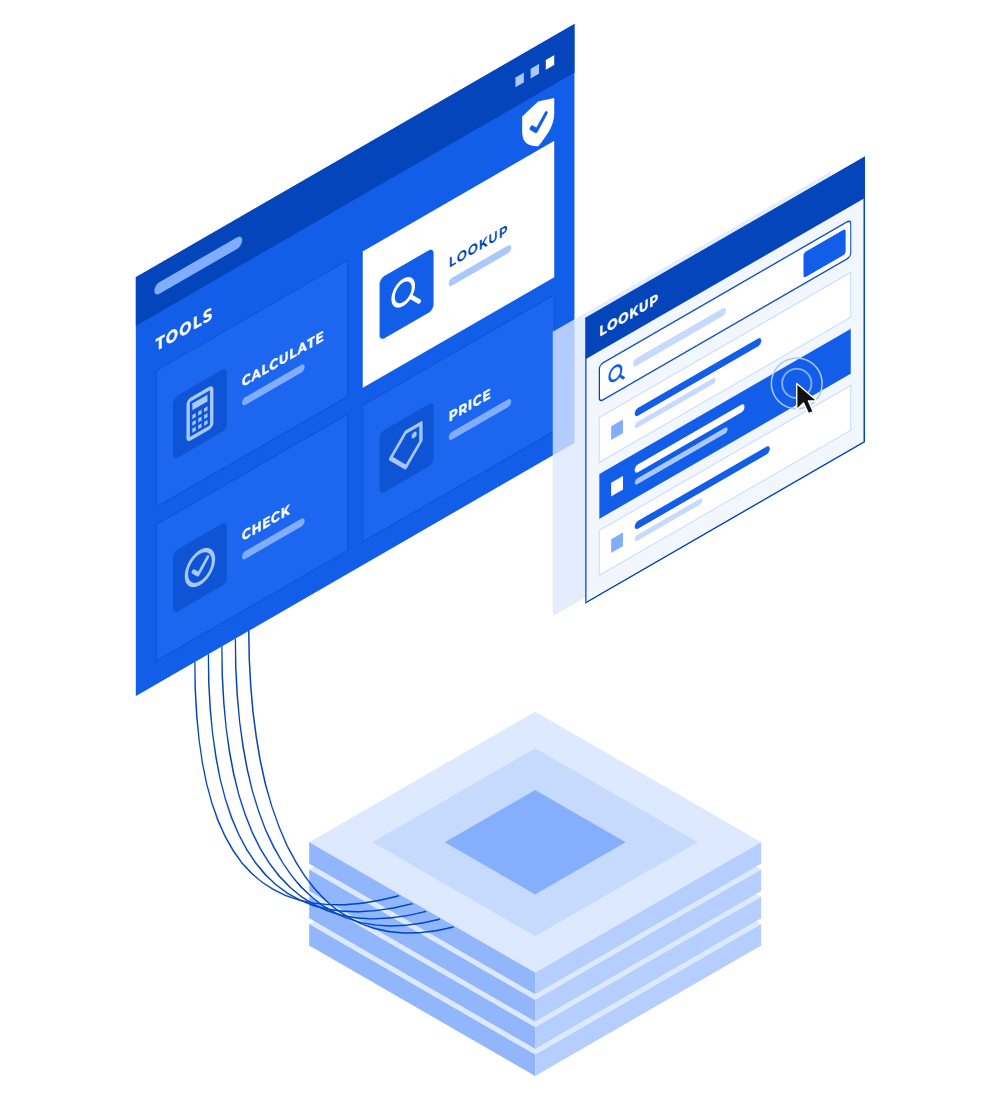
Find, check and update all in one place

Curated tool libraries
Tools are organized in categories and libraries for each team's data, so everyone knows where to look.

Lookup tools
Search one type of record by code or name, see the matches in the columns you need, and open the one you pick.

Open inside the platform
Tools open right inside EDOP, with your current session and access. No extra app, no separate login.

Same access rules
Every tool reads data with the person's own access, checked on the server, just like the rest of the platform.
No separate copy of your data
Tools keep no data of their own. They read and update your governed records directly, so every run works on the current data.

Registered, with an owner
Every tool is registered and belongs to one data area, so nothing runs without an owner.

Admin control, no code
Create categories and libraries and assign tools to them from Admin, without a code change.

Hidden until ready
A tool stays out of sight until an administrator places it in a library, and a library only shows once it's marked ready.
Quick answers for the questions your teams ask every day
Whatever your teams need to look up or check, Data Tools answers from the same governed records, right inside the platform.
Product lookups
Let sales and commercial teams find a product by code or name and open its full record, instead of searching an old export.
Price updates
Update a product's price from one simple screen, under the same access rules as the rest of the platform.
Part & supplier lookups
Give plants and buyers a quick way to find the right part or supplier, from the data area that owns them.
Quick checks across records
Run a guided check across several types of records in one screen, instead of clicking through several lists.
Everyday calculators
Bring the calculators teams rely on into the platform, so everyone applies the same logic to the same data.
Retiring spreadsheet helpers
Replace the lookup spreadsheets and bookmarks passed around in chat with one place each team knows to look.

Introducing Black Tiger’s Enterprise Data & Operations Platform
Questions we hear
Who builds the tools?
Each tool is built for your organization by the implementation team, around the questions your teams ask most. To ask for a new tool, you simply describe the question it should answer.
Can our administrators manage tools without developers?
Yes, for where tools appear. Administrators create categories and libraries and decide which tools each team sees, with no code change. New tools, or changes to what a tool does, go through the implementation team.
Do we need Data Hub to use Data Tools?
Data Tools reads the governed records already in the platform. It works best with Data Hub, which keeps those records clean and up to date, so every tool answers from current data.
Does a tool keep its own copy of our data?
No. Tools keep no data of their own. They read and update your governed records directly, so every run works on the current data.
Can a tool show people data they shouldn't see?
No. Every tool reads data with the person's own access, checked on the server, and only appears in the data area it belongs to.
Ready to stop hunting for the right tool?
Data Tools brings your team's lookups and checks into one place, reading the records you already govern in Data Hub.
Prefer to pick a time now? Get a demo →
